Making a usable shot with Grok Imagine Video 1.5
Release channels
- Imagine API
- Video 1.5Generally available
- Web, iOS & Android
- Video 1.5 FastRolled out
On June 24, 2026, a Reddit user described testing Grok Imagine 1.5 across roughly 200 video generations. They reported faster generation and said the earlier model had produced more natural motion and speech. Their account captures a practical question for anyone making clips with the new model. How much does a quicker first take help if the audio or the performance has to be redone? The author’s access route and exact model variant remain unconfirmed. June 24 user evaluation
What opened on June 16
The June 3 preview let developers send one starting image and a motion prompt to the xAI API, with output up to 720p. On June 16, xAI made the regular model generally available through the API as grok-imagine-video-1.5. In the same announcement, xAI said it had rolled out Video 1.5 Fast on grok.com/imagine and in the iOS and Android apps. Its example of a six-second 720p clip taking about 25 seconds was a vendor result for Fast. The Reddit evaluation provides a user's account of speed and quality without identifying which of those routes they used. June 3 API preview · June 16 API and app announcement · Reddit evaluation
On July 31, xAI announced text-to-video and native 1080p on the web, iOS and Android. Image and voice references had a staged consumer rollout that began in the US for SuperGrok Heavy and Plus on the web and iOS. The same update listed image references, text-to-video and native 1080p for the xAI API. A June image-to-video trial and a later reference-driven shot therefore start from different documented controls. July 31 references and 1080p announcement
From a still to a sample launch clip
In a June 22 post on Tremendous, its author Francis shared a mock launch video for an app. He began with a portrait of himself and a short prompt. He found the result more realistic with the portrait as a starting image and pointed out that the app screens in the generated clip were generic. The published example shows where a supplied asset helped and where product-specific assets were still needed. It was a marketing exercise for an imagined startup, and the generation route is unconfirmed. Tremendous launch-clip trial
Four takes in the browser
- Input
- A generated portrait with the mouth clearly visible.
- Timing problem
- On the second take, lyrics drifted from the melody.
- Revision
- For take three, the creator slowed the song and supplied two lyric lines.
Explore the four-take workflow
The diary records four six-second video attempts in Grok Imagine on the web at the 480p setting. It describes the timing issue in take two and the changes in take three. The backend variant was unconfirmed.
Read the creator’s production diary ↗ · Watch the creator’s final clip ↗
An October 17 production diary on note.com identifies the interface as Grok Imagine in the browser. The creator, kou, generated a portrait, picked a frame with the mouth clearly visible, and animated it as a six-second singing clip at the 480p setting. The diary describes four attempts and a timing problem with the lyrics on an early take. The creator slowed the song and supplied two lines of lyrics before selecting a result. The account makes the cost of iteration visible in takes and prompt changes. The backend model variant remains unconfirmed. The browser workflow, prompts, and result
A product brief through a third-party API
In a late-October Runway Dev comparison, Runway product marketer Alex Breg ran the same briefs across several models on the platform. The published Grok Imagine Video 1.5 sample takes a lipstick reference and a brief specifying the action, camera movement, a spoken line and synchronized sounds. It gives readers a clip to assess against that brief and names the Runway Dev route. The output belongs to Runway’s own test on its platform. Runway Dev’s prompt and comparison clips
The cases offer concrete checks for a production brief. The launch clip needs the correct product on screen. The singing portrait needs intelligible words and matching mouth movement. The ad needs the product reference to survive the action and the camera move. Time to a usable take would require logging retries and audio corrections with the same brief and settings on each route. The launch dates establish when those routes became available, and the case reports show what had to be checked in specific clips.
External benchmark
Continuous shot. Orbit a stone horse statue once, in a single slow take, and finish where the shot started.
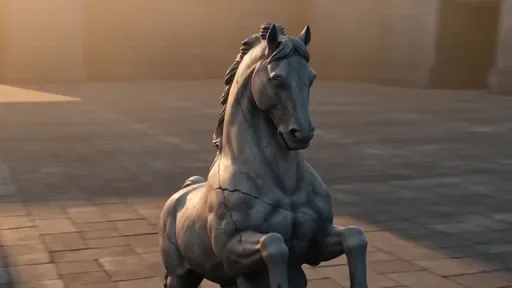 Seedance 2.0 Fast6/6$0.73165.0 s
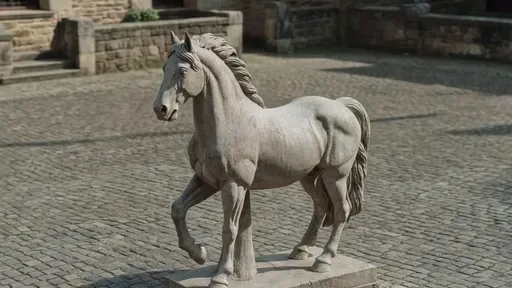 Grok Imagine Video 1.55/6$1.1273.4 s
View test conditions
Conditions summarized from the original prompt.
- One slow orbit with no cuts
- Keep the statue centered
- Return to the starting view