How ChatGPT Images 2.0 changed the infographic brief
On April 21, 2026, a Reddit user gave ChatGPT a brief for a portrait infographic about the image model that had just launched. The brief specified a 4:5 layout, a brand accent, and a subject that required gathering and summarizing information. The author shared the resulting image and said they had used Thinking with image generation. They also pointed out that the shortened model name came from their own prompt. The post shows the brief alongside the resulting graphic. The sources consulted inside that session remain unverified. Launch-day infographic and prompt
What changed at launch
OpenAI's December 2025 release had already emphasized dense text rendering, closer instruction following, and more precise edits. In April, OpenAI added an image workflow that could plan the composition and use tools such as web search before rendering. The release notes list the base image generator across ChatGPT plans and image generation with thinking on paid plans when a Thinking or Pro model is selected. For an infographic brief, this brought information gathering and layout into the same request. December release · April release notes · Images 2.0 system card
A newsletter with source numbers
What to check before publishing
- Match each percentage to the source.
- Check that every category appears in the brief.
Lilach Bullock tried the free-tier generator on a newsletter redesign write-up. She supplied the article and her logo, then asked for a featured image and nine inline graphics using her brand and the article's figures. Some drafts pulled together the intended structure and data. In one overview, however, the graphic printed a 1.2% click rate where the source figure was 1.69%. In another, the model introduced a category that was absent from the article. Bullock identified both issues while reviewing the drafts she showed. The post documents work on a real brief. Final use of the entire asset set in that newsletter project remains unconfirmed. Bullock's brief, outputs, and review
A follow-up with an expert reader
Genealogist Diane Henriks published two examples on May 24, about a month after launch. For her early trial, she supplied a troubleshooting article and her own notes. The infographic largely preserved the article's main sections, she reported, then added educational material that included misleading or invented references. In the later example, the image omitted the reading list and Henriks judged the result more accurate. She dates the trials to May 4 and May 23. The workflow and output structure differed, which leaves the cause of the improvement open. Henriks's two rounds of testing
What the editor still had to check
The cases put the editorial work in view. The Reddit prompt supplied a format and a topic. Bullock gave the generator source copy, figures, and brand assets, then compared the text and charts with the article. Henriks worked from material she knew well enough to spot credible-looking errors in the references. Across those briefs, the relevant test was whether each label, number, and citation survived the move into an image. A same-brief comparison that follows the graphic through corrections and final publication would help establish how much time the workflow saves and where it adds review. Newsletter graphics · Genealogy graphics
External benchmark
Minimal image edit. Replace a sign’s lettering while preserving the sign, wall, lighting and framing.
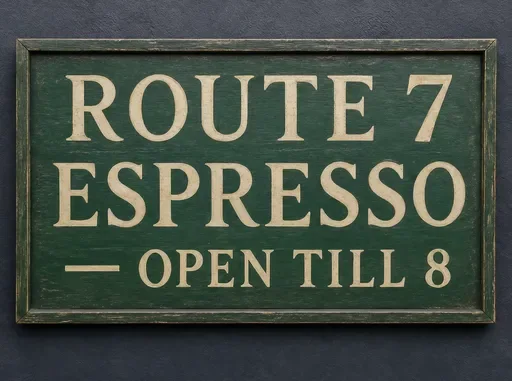 K3 Edit2/3$0.01012.3 s
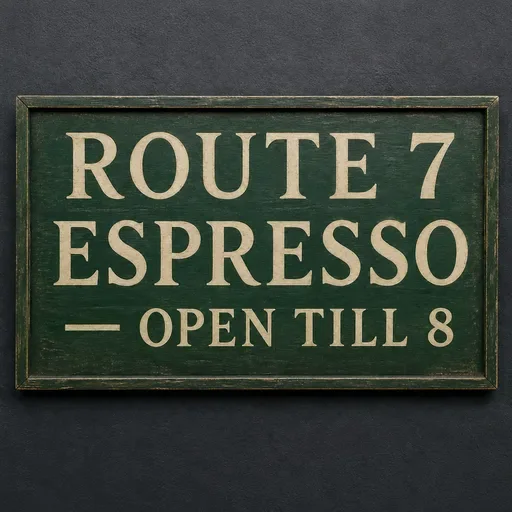 GPT Image 22/3$0.02020.8 s
View test conditions
Conditions summarized from the original prompt.
- Change the lettering on the sign
- Preserve the wall and lighting
- Keep the original framing