An Affinity file reaches a Cavalry composition
Canva grouped Affinity, Cavalry, Flourish and Leonardo under ProSuite on September 16, 2026. One connection made the change concrete. A designer could bring a layered Affinity document into Cavalry in its native .af format and place the artwork on a composition. Affinity’s September release notes described Cavalry 2.8 as upcoming. Cavalry’s own notes date the release to September 30 and list native Affinity file support. That separates the suite announcement from the dated release of the receiving application. Canva ProSuite announcement · Affinity September release notes · Cavalry 2.8 release notes
What reached the composition
Cavalry’s documentation pictures an Affinity asset imported into a composition as separate layers. In that workflow, the designer drags the file into the viewport from the Assets Window or the file system. Cavalry offers a single Asset Layer for the whole document or Separate Layers for individual parts. Separate Layers produces a Footage Shape and Image Shader for each source layer. The illustration establishes a placed result with individual layers available in the receiving composition. The documentation gives a product version and import procedure through its accompanying release notes, while the image itself has no published capture date or project credit. Cavalry Affinity Asset guide · Cavalry composition example · Cavalry 2.8 release notes
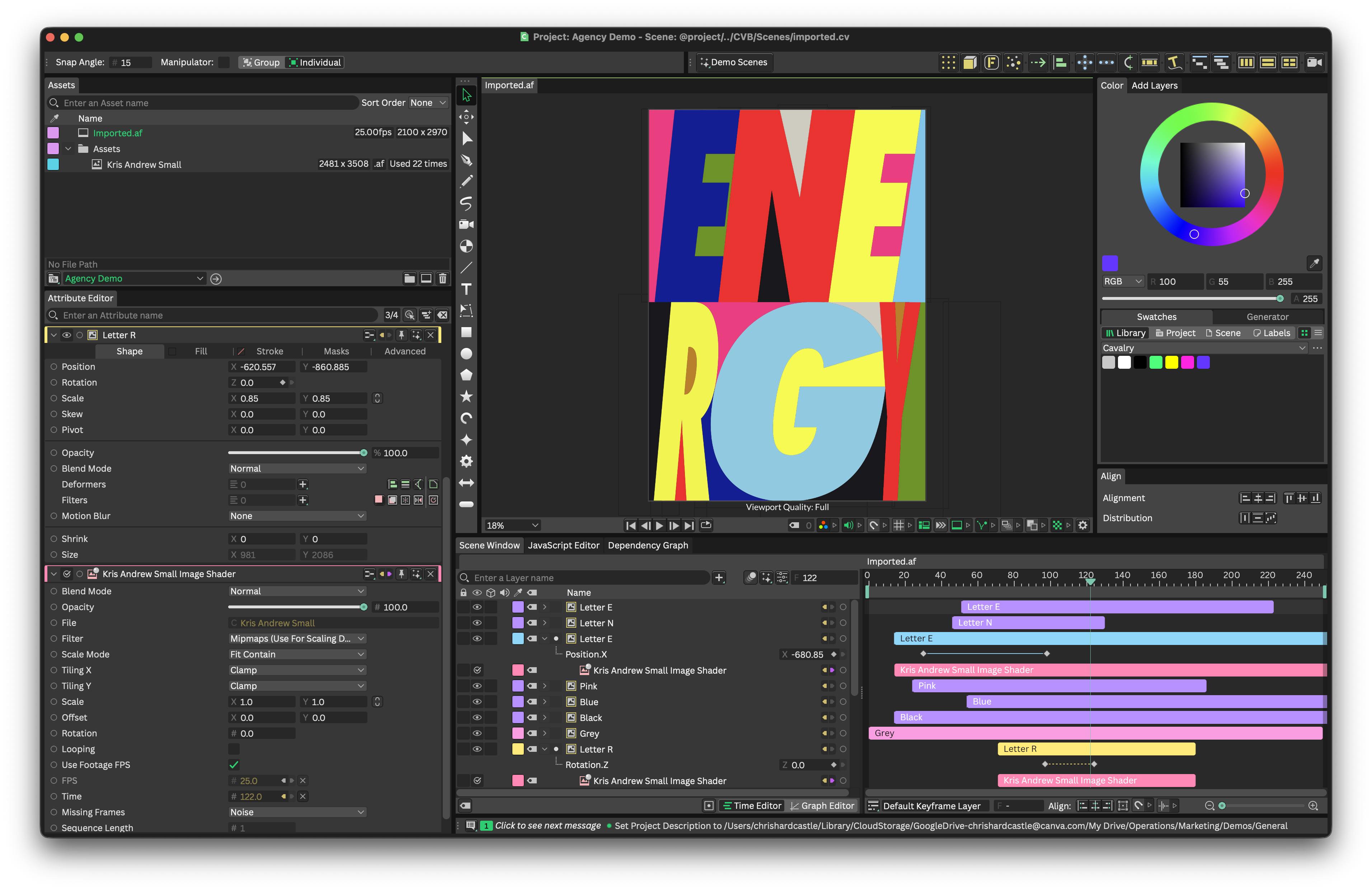
The layer choice matters to the motion designer. Separate Layers creates individual elements that can be handled in the receiving scene, and Asset Layer keeps the artwork together as one element. Cavalry rasterizes the Affinity vector shapes during this import, so the receiving layers carry rendered artwork. Cavalry also documents a specific limit on revisions. If a designer adds or removes layers in Affinity after placement, reloading the asset leaves the composition’s layer structure as it was. Reimporting the document is how the changed layer structure reaches the composition. The vendor example shows the state after placement. It supplies neither a rendered animation nor measurements of the time saved in preparing it. Cavalry Affinity Asset guide
What practitioners reported
An October 4 tutorial listing by Andrew Buckle names Affinity 3.3, Cavalry 2.8, native Affinity files and filter effects. The listing provides the date and the author’s description. The original video did not expose inspectable frames or a transcript during this research, so the specific filter result remains unverified. On October 12, a CavalryMotion Reddit submitter described a different outcome. Cavalry accepted their file for import, but the artwork failed to appear when dragged into a composition. The post supplies no source document or diagnosed cause. Together these sources put the feature in the hands of practitioners shortly after the September 30 release and show why the receiving composition is the place to verify the handoff. Andrew Buckle tutorial listing · October 12 CavalryMotion report
The September announcement also illustrated a Cavalry countdown whose wording could be edited inside Canva. Canva described that path as coming soon, and Cavalry’s guide describes a gradual rollout for exporting a .cvb and importing it into a Canva design. The 2.8 release also lists Canva Sheets support for its Spreadsheet Utility. Those are distinct transfers. The illustrated Affinity example documents one concrete result for ProSuite at the level of a native source file and a destination composition. It leaves the broader workflow across all four products open. Canva ProSuite announcement · Cavalry for Canva Designs · Cavalry 2.8 release notes